
Halo by Synquic

The browser that
works for you.

A private browser with an encrypted password manager, an SSH client, and AI that runs on your own computer.

Mac, Apple Silicon and IntelWindows 10 and 11
Halo with a page open and the Halo AI panel answering a question about it, next to the sidebar of tabs.

Works with the AI tools you already use

  • Claude Code
  • Claude Desktop
  • Cursor
  • VS Code
  • Windsurf
  • Codex
  • Any MCP client
Private by design

Encrypted before it leaves your device.

Your account key never reaches Synquic. Its servers store only ciphertext they cannot read, and your recovery key is shown to you once, at sign-up.

1. Your device

Encrypts everything

Your account key stays here, in the system keychain. XChaCha20-Poly1305 encrypts your vault, bookmarks and history.

2. Synquic sync server

Stores what it cannot read

Only ciphertext and keys it cannot open. Nothing it holds can decrypt your data.

3. Your other devices

Decrypt locally

A new device gets your key when you approve it on a device that is signed in, or when you enter your recovery key. Then it decrypts locally.

  • Zero knowledgeThere is no password. The server never holds your account key.
  • Every record encryptedXChaCha20-Poly1305 with a random 32-byte account key. The server rejects plaintext.
  • Stay signed inYour account key is kept in the system keychain, so Halo opens without typing anything. Lock and auto-lock use Touch ID on Macs that have it.
What's inside

One browser,
fewer apps to juggle.

Halo Settings showing Passwords and autofill: save and fill switches, a password check that flags 2 weak and 2 reused passwords, and a list of saved logins.

A password manager built into the browser.

Halo saves new sign-ins as you make them, with Undo, and suggests a strong password on sign-up forms. Pick a login from the Halo menu inside the username or password field, and Halo fills it only on the exact site it was saved for.

  • Import from Chrome, Dia, Arc, Brave, Edge, Vivaldi, Opera or a CSV file
  • Logins, cards, notes, aliases and one-time codes
  • Password check flags weak and reused passwords
  • Reveal, copy with auto-clear, edit and delete in Settings
Halo's SSH Hosts page with hosts grouped into Personal, Production and Staging.

An SSH client, synced and encrypted.

Keep your servers next to your tabs. Hosts and keys live in the same encrypted vault as your passwords, so they follow you to every device you sign in on.

  • Hosts with groups, search and quick connect with user@host:port
  • Generate ed25519 keys or import your own
  • Terminal tabs that stay connected in the background
  • Known-host checks block a server whose key changed
  • Port forwarding, snippets with variables and SFTP
The Halo AI panel open beside a web page, answering a question about it with Halo AI.

AI that runs on your computer.

Halo AI answers questions, summarizes pages and gets things done in the browser: opening sites, searching, filling forms and shopping, asking you before anything that pays or sends. It runs on your computer, so your pages stay on the device unless you let Halo Cloud help with harder tasks.

  • Open it beside any tab with ⌘ E (Ctrl E on Windows)
  • Hands-free voice with on-device speech recognition
  • Fix with Halo rewrites selected text in any field
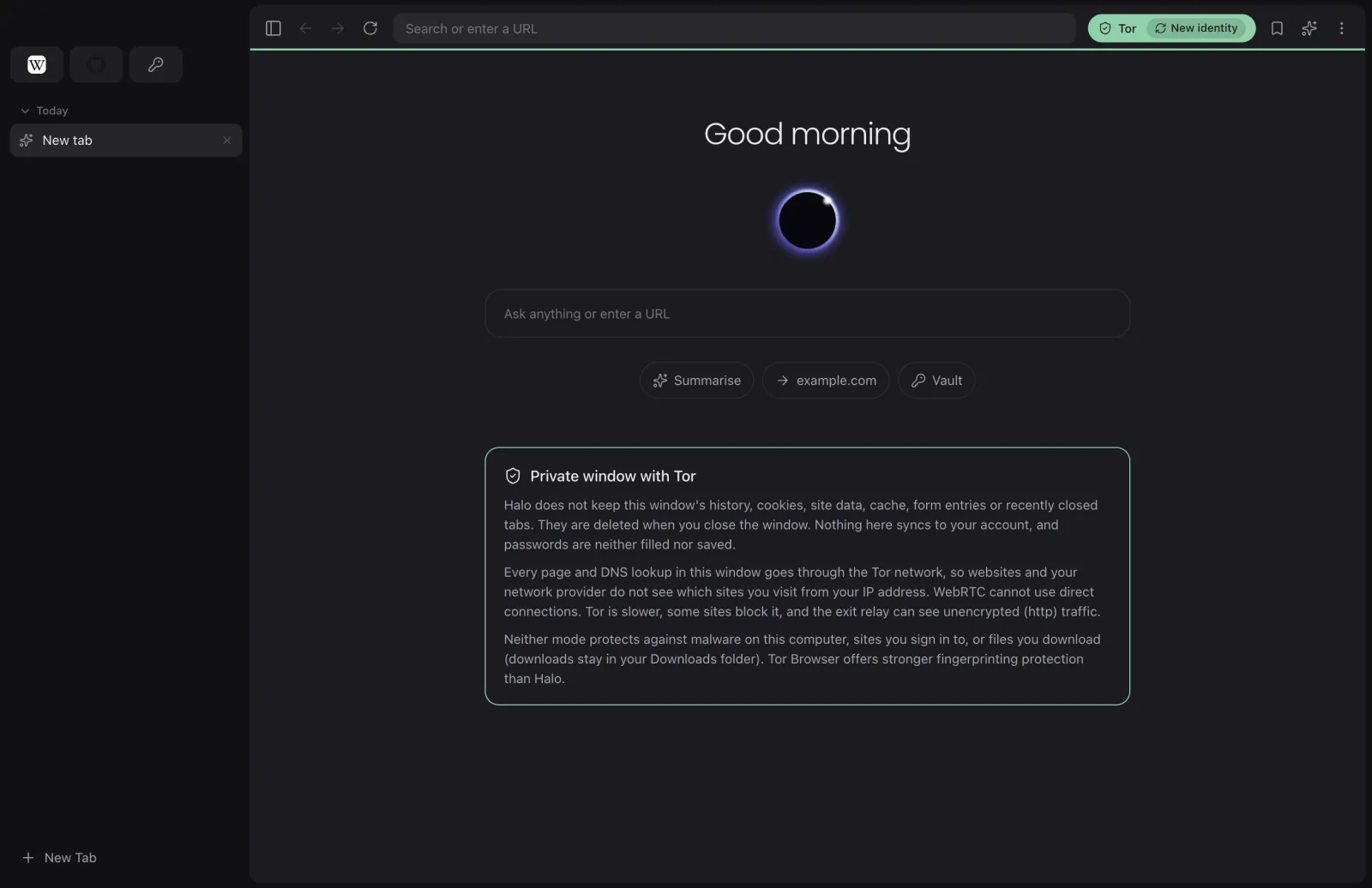
A private window with Tor in Halo, showing the Tor status and New identity buttons and an explanation of what the window keeps.

Fewer trackers. Tor when you need it.

Shields blocks ads and trackers on every site using Ghostery's open-source engine and filter lists, with a per-site switch. Private windows keep nothing on disk, and a private window with Tor sends every page and DNS lookup through the Tor network.

  • Global Privacy Control for sites that honour it
  • Tor is downloaded from the Tor Project and its signature verified
  • New identity in one click
  • WebRTC cannot leak your address in Tor windows
Made for daily use

Built around how you browse,
not the other way round.

Three layouts, one browser.

A vertical sidebar, a compact single bar, or classic tabs along the top. Switch any time in Settings, Appearance.

Move in without retyping.

Bring bookmarks, history and passwords from the browsers you already use, or a passwords CSV from Safari, Firefox, 1Password or Bitwarden. Everything is encrypted on your device before it syncs.

A profile for each part of your life.

Keep work and personal browsing apart. Each profile has its own data and its own Halo account, with a switcher at the top of the sidebar.

Write it better, where you are.

Spell check with suggestions, and Fix with Halo in any text field: fix spelling and grammar, make it shorter, more formal or friendlier, using Halo AI on your computer.

Talk to it. It talks back.

Turn on voice in Halo AI and just ask. Halo Voice transcribes your speech on your device and reads the answers aloud.

Bring your extensions.

Install extensions from the Chrome Web Store, or load an unpacked extension from halo://extensions. A few extensions use Chrome features Halo does not support yet.

Your data
stays yours.

Synquic's servers only ever store ciphertext. Your account key and recovery key never reach Synquic, and AI agents never see your saved passwords.

Read the security design
  • End-to-end encrypted sync
  • AI that runs on your device
  • Agents never see passwords
Agents and MCP

Let your agents
drive real tabs.

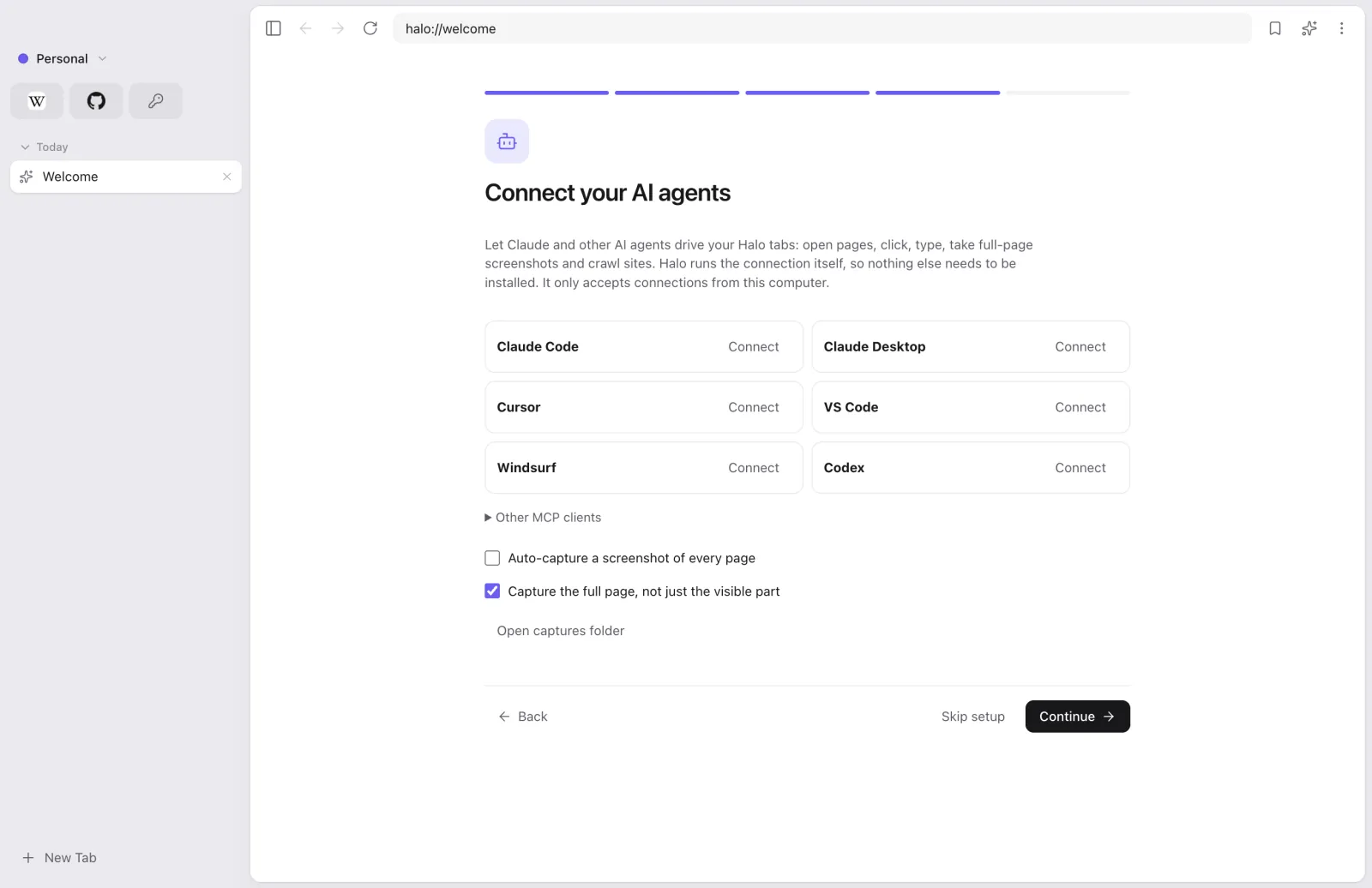
Halo has a built-in MCP server. Connect Claude Code, Claude Desktop, Cursor, VS Code, Windsurf or Codex in one click, then let them navigate, click, type, take full-page screenshots and crawl sites in your own browser.

Halo's Connect your AI agents screen with one-click Connect buttons for Claude Code, Claude Desktop, Cursor, VS Code, Windsurf and Codex.

Sign-ins need your OK.

An agent can ask Halo to sign in with a saved login. Halo asks you first and fills the page itself. The password is never returned to the agent.

Autofill is paused on tabs an agent controls

Only from this computer.

The MCP server listens on 127.0.0.1 and needs a 32-byte bearer token stored in your profile.

Screenshots, crawls, auto-capture.

Full-page captures and breadth-first crawls that share your logins. Files are saved to Pictures, Halo Captures.

No Node.js needed.

Clients that launch a command use Halo's built-in stdio bridge: Halo --mcp-stdio.

Set up your agent

FAQ

Good questions.

Can Synquic read my passwords or history?

No. Halo encrypts your vault, bookmarks, history and settings on your device, with a random account key, before anything syncs. Synquic's servers store only ciphertext and keys they cannot open, which is not enough to decrypt your data.

What if I lose all my devices?

Sign in on the new device with your email, then choose Use recovery key and enter the recovery key Halo showed you when you created your account. If you still have another device that is signed in, you can approve the new one there instead. Without a signed-in device or the recovery key, nobody can recover your data, including Synquic.

Does Halo AI send my pages to the cloud?

Not by default for everyday questions. Halo AI runs on your computer; it installs once after you first sign in and is checked against a pinned hash. Only when it cannot finish a task, such as ordering or filling a long form, and Halo Cloud is on (Settings, Halo AI), the request and the page text it needs go to Halo Cloud, run by Synquic on Amazon Web Services. Synquic does not store them, and private windows never use Halo Cloud.

Which AI tools can control Halo?

Claude Code, Claude Desktop, Cursor, VS Code, Windsurf and Codex connect in one click from Settings, Agents. Any other MCP client can connect with Halo's local URL and bearer token, or by launching Halo's built-in stdio bridge.

Can an agent see my saved passwords?

No. Autofill is paused on tabs an agent controls. When an agent asks to sign in, Halo asks for your approval and fills the page itself; the password is never returned to the agent. Halo's own window, which holds your unlocked vault, is not reachable through MCP.

Why does my Mac or PC warn me when I open Halo?

Halo's installers are not yet code-signed with Apple and Microsoft certificates, so macOS and Windows SmartScreen show a warning the first time. On a Mac, right-click Halo by Synquic in Applications and choose Open. On Windows, choose More info, then Run anyway. Step-by-step instructions

Do Chrome extensions work?

Halo installs extensions from the Chrome Web Store and can load unpacked extensions. Halo supports most of Chrome's extension features; a few extensions may not work fully yet.

Is a Tor window as private as Tor Browser?

No. A Tor window sends every page and DNS lookup through Tor and stops WebRTC from leaking your address, but Tor Browser has stronger fingerprinting protection. Use Tor Browser when you need the strongest anonymity.

Browse like it's
yours again.

Private by default, with AI that stays on your computer.